Replication comes first
Structuring python data science projects for replication
Outline
- Why replication is important.
- Why researchers find replication hard.
- How to make replication easy.
Replication is not optional
- If you want to publish at any top journal or the Bank of Canada website, you will need to prepare a replication package.
Replication should not be optional
- Replication is the heart of science.
- We are empiricists; we shouldn’t trust what we can’t see.
- The most likely replicator is you six months from now.
Why the hate?
- Replication is hard:
- It is harder to get it working on every computer than just your own.
- Replication is boring:
- It is the last step to publication and you’re probably already bored of the project.
Start on the right foot
It is easier to:
- maintain a replicable project than convert to one.
- make every project replicable than a particular one.
So, you should use a consistent project template.
Suggested template
│   environment.yml         # Conda environment used for project
│   LICENSE                 # Open-source license
│   pyproject.toml          # Package metadata and configuration
│   README.md               # Brief documentation
├───data
│   ├───interim             # Intermediate data that has been transformed
│   ├───processed           # The final, canonical datasets
│   └───raw                 # The original, immutable data dump
├───docs                    # MkDocs documentation
├───models                  # Output models and model results
├───reports
│   ├───figures             # Output figures
│   └───tables              # Output tables
└───src
    └───thispackage         # Python package
            __init__.py     # Makes package installable
            config.py       # Configuration parameters
            dataset.py      # Clean and output data
            plots.py        # Generate plots
Environment
Telling the computer how to run your code.
environment.yml
environment.yml—new dependency
pyproject.toml
[build-system] # Tells pip how to install the package

[project]      # Contains project metdata

[tool.ruff]
line-length = 79

[tool.ruff.lint]
extend-select = [
    "PTH", # Suggest pathlib instead of os
    "PD",  # Pandas best practices
    "D"    # Require docstrings
]

[tool.ruff.lint.pydocstyle]
convention = "google"
Documentation
- README: Broad overview and replication steps.
- MkDocs: Detailed code documentation.
README
A well-structured project can have a simple README.
# This Package

Brief project description.

<!-- Environment and docs boilerplate -->

## Replication procedure

All raw data is included in `./data/raw`.

To replicate project outputs, first collect the dataset by running:
```powershell
python ./src/thispackage/dataset.py
```

Then generate the outputs with:
```powershell
python ./src/thispackage/plots.py
```
MkDocs
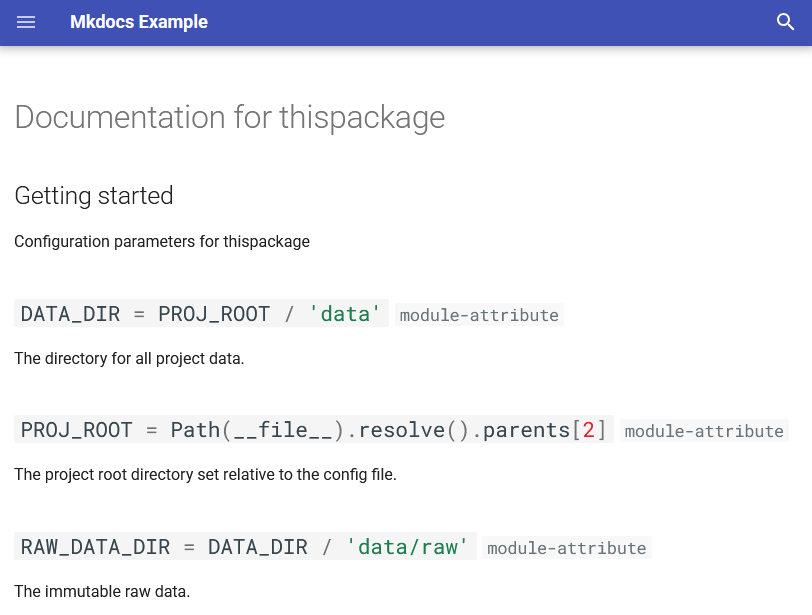
A simple static site generator for documentation.
MkDocs example
Code
- Paths should be file-system agnostic.
- Important parameters should be defined in
config.py.
File system
- Use pathlib.Path.
- Define each path relative to a common root.
Using path parameters
Very wrong
Wrong
Right
Using the template
The template is available from github.
To use:
conda create -n Cookiecutter python=3.13 cookiecutter pre-commit
conda run -n Cookiecutter --no-capture-output `
  cookiecutter https://github.com/henrystern/cookiecutter-python-data
Or you can create your own cookiecutter template.
Conclusion
- Start your projects knowing you’ll have to make a replication package.
- Use a project template to handle the replication boilerplate.
Appendix
I didn’t mention every feature of the template.
Specifically, I glossed over the git configuration.
Git is a fantastic tool that you should use, but it is a bit more of a commitment.
This appendix will quickly cover the files I skipped.
.gitignore
Controls which files are included in the repository.
Datasets should usually be excluded, as should binary outputs.
.gitkeep
Just an empty text file.
This is useful if you have gitignored output files but need the directory to avoid errors. Without it, empty directories will not be created in the git repo.
For example, this line will fail if networks is not a directory in PROCESSED_DATA_DIR, so you would add a .gitkeep file in the networks directory.
.pre-commit-config.yaml
Configures ruff to lint and format code before each commit.
It will help you maintain quality standards, especially complete documentation.
Requires that pre-commit be installed and that the hooks be initialized with pre-commit install.
The hooks are automatically initialized if you include git while creating the template.
LICENSE
This is an optional open-source license for the project.
It is unnecessary for work projects, but should be included if the code is made public.
Remember that the Bank own’s the copyright to all projects made at work.